Demo Account vs Real Account: Differences
Understand the differences between demo and real accounts on Futura Broker and learn when it's the right time to trade with real money.
You have R$ 10.000 in your demo account, you trade every day, and the chart is identical to the one on the real account. So why does the idea of switching to a real account give you butterflies?
Because the platform is the same. The assets are the same. The indicators are the same. What changes is what's at stake — and that changes everything.
In this article, you'll understand exactly what is different between the two accounts and get objective criteria to decide when to switch. If you haven't tried the demo account yet, start with the guide on how to place your first trade.
What is the same in both accounts
A lot. In practice, the demo account is a faithful copy of the real account:
- Same assets — crypto, currencies, stocks, commodities — with the same real-time prices
- Same charts and indicators — everything you use on the demo works the same on the real account
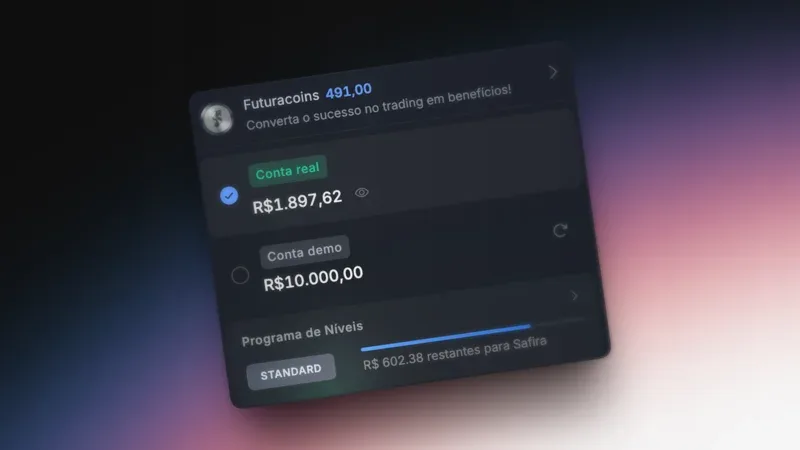
- Same interface — switching between accounts is one click on the selector at the top of the screen
- Same execution speed — trades open and close in the same amount of time
- Same expiration times — 1 minute, 5 minutes, 10, 15, 30 minutes and 1 hour
The platform doesn't change. What changes is the weight of every decision.
What is different
Here's the direct comparison:
| Demo Account | Real Account | |
|---|---|---|
| Starting balance | R$ 10.000 (automatic) | R$ 0,00 (requires a deposit) |
| Reload balance | Unlimited, resets to R$ 10.000 | Only via deposit (min. R$ 60) |
| Minimum trade amount | R$ 0,50 | R$ 0,50 |
| Withdrawals | Not available | Yes (min. R$ 120, 4.99% fee) |
| Real profit | No — virtual money | Yes — withdrawable to your bank account |
| Tier progression | Doesn't count | Counts (Safira, VIP, Royal) |
| Extra payout by tier | No | Yes (+1% to +4%) |
In practice, the demo account is a perfect copy of the real account — with one difference that changes everything: the money. And with it comes emotion.
The real account also unlocks the tier system: as your balance grows, you move up levels (Standard → Safira → VIP → Royal) and earn a payout bonus on every trade. On the demo, this doesn't exist.
The psychological effect of real money
This is the difference that no table shows.
On the demo, you follow your strategy calmly. The RSI is at 72, you wait for it to cross 70 to confirm. Perfect discipline. No rush.
On the real account, the same setup with R$ 10 of real money makes your heart race. The RSI is at 68 — "close enough to 70, I'll get in now." You anticipate the signal, enter too early, and lose.
And then comes the worst part: the urge to win it back. Revenge trading is 10x more likely with real money. The anger of losing R$ 10 in real money is completely different from losing R$ 10 in virtual money. That impulse to "win it back on the next one" is Mistake #2 of the 5 mistakes every beginner trader makes — and it destroys more accounts than any bad strategy.
This is normal. Every trader goes through it. The difference is that those who prepare on the demo arrive at the real account with habits, not impulses.
When to switch to the real account
Don't switch "when you feel ready." Switch when the numbers say you are. Here's the checklist:
You're ready when you can check off all 5:
- ✅ You've traded on the demo for at least 2 weeks — enough time to experience different market conditions
- ✅ A win rate above 55% over the last 50 trades — with a payout of ~84%, 55% already puts you in the positive
- ✅ You followed bankroll management (1-3% per trade) consistently — no "this time it's different" exceptions. If you want to deeply understand how to calculate this amount and why the rule works, read the definitive guide to bankroll management
- ✅ You set a daily loss limit and respected it — if you set 3 consecutive losses as your limit, you stopped at 3
- ✅ You can describe your strategy in one sentence — e.g., "I trade in the direction of the Supertrend with RSI confirmation below 30 or above 70"
If you didn't check off all 5, stay on the demo. It's not a defeat — it's preparation. The market will still be there when you're ready.
How to make the transition without blowing up your bankroll
If you passed the checklist, follow these steps to protect your capital during your first real days:
- Deposit the minimum: R$ 60. Don't deposit R$ 500 "to have more room" — deposit the minimum and trade with the minimum.
- Trade with R$ 0,50 per trade. Yes, the profit is small. But the goal in the first real weeks isn't to make money — it's to maintain discipline with real money.
- Keep the demo open. Want to test a new indicator? A new asset? A new time of day? Test it on the demo first. Always. Switching between accounts is instant — one click on the selector at the top of the screen.
- Increase the amount gradually. After 2 profitable weeks at R$ 0,50, move up to R$ 1. Then R$ 2. No rush.
For the step-by-step on how to deposit, read our guide on how to make deposits and withdrawals.
The demo isn't training — it's a laboratory
Calling it a "training account" implies it has an end. That at some point you "graduate" and no longer need it. That's not true.
The demo account is a permanent laboratory. Experienced traders use the demo to:
- Test new indicators risk-free
- Try assets they've never traded before
- Practice at times different from their usual
- Test changes in timeframe and expiration
- Trade OTC assets — available 24/7 to practice anytime
The demo is just as useful on day 1 as on day 365. It doesn't lose value over time — you're the one who gains value from it.
Summary
Same platform, different weights. The demo account prepares you, the real account rewards you. The best traders use both — the real one to trade with discipline, the demo to evolve without risk.
If you're still starting out, first understand what binary options are. If you've already practiced on the demo and passed the checklist, the next step is yours.
Visit futurabroker.com and start with the demo account — when the numbers show you're ready, the real account is just one click away.